

Budget Planner Excel Template for Monthly Financial Planning
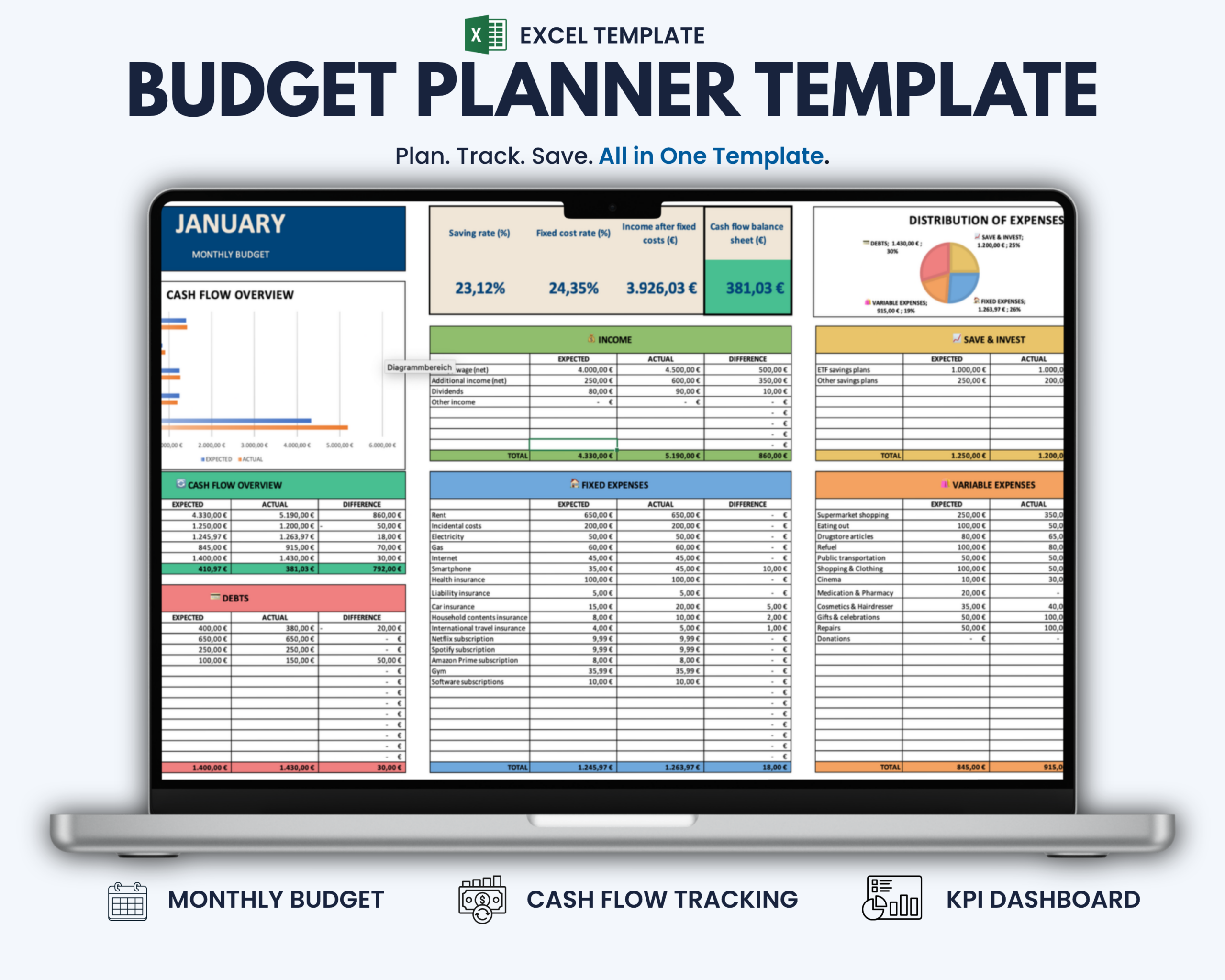
The Budget Planner Excel Template helps individuals and households plan, track and review monthly finances in one structured Microsoft Excel overview.
Instead of calculating totals manually or managing income, expenses and savings across separate sheets, the template brings your monthly budget together in one clear workflow.
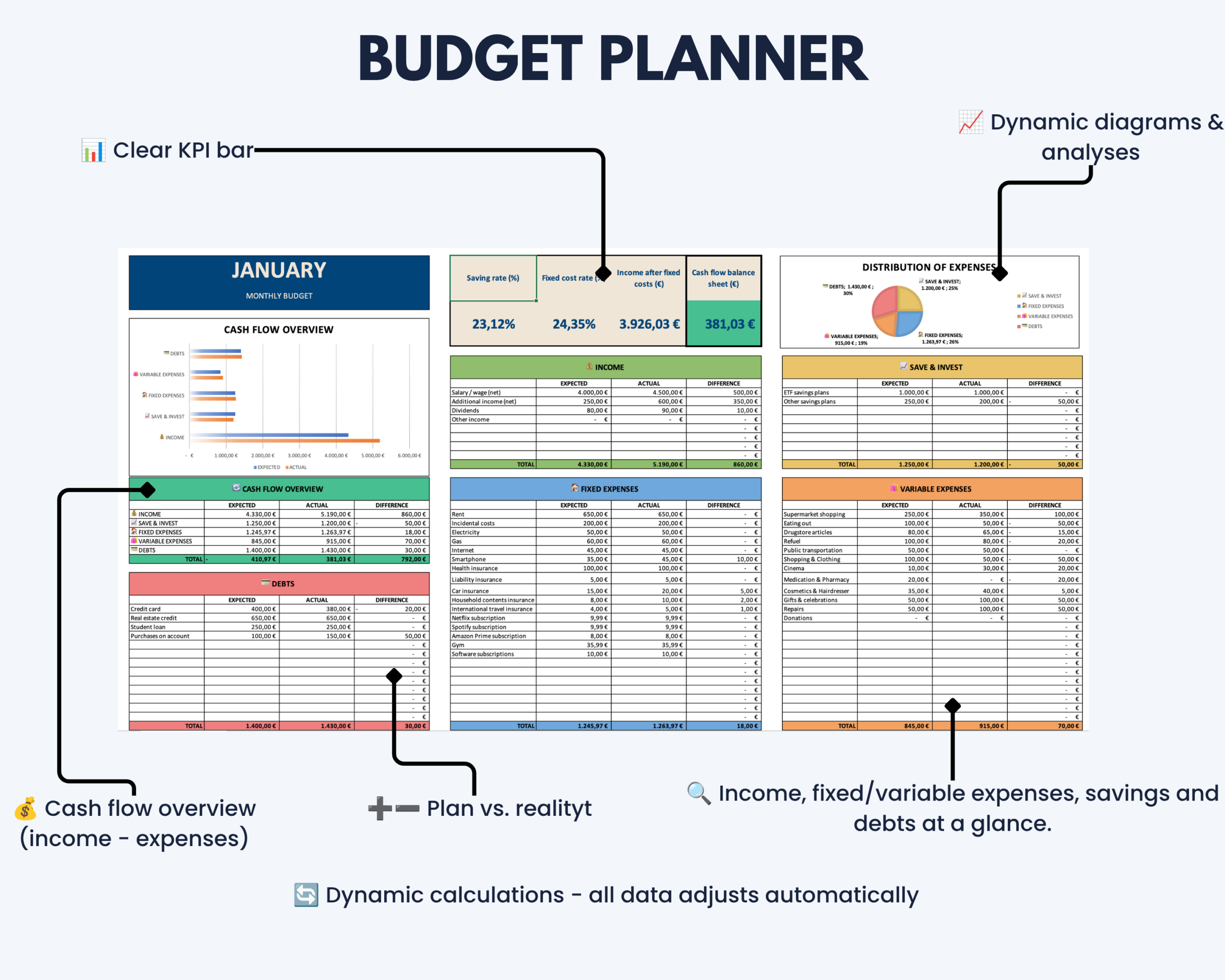
Enter your expected amounts at the beginning of the month, add actual figures as the month progresses and let the template automatically calculate budget differences, cash flow, savings metrics and your remaining balance.
What This Budget Planner Helps You Do
- Plan expected monthly income
- Track fixed and variable expenses
- Compare planned amounts with actual results
- Monitor savings and investment contributions
- Keep debt information visible
- Calculate monthly cash flow automatically
- Review your remaining balance
- Monitor your savings rate
- Identify positive and negative budget variances
- Understand your monthly finances through visual charts
What’s Included
Your digital download includes:
- Microsoft Excel monthly budget planner
- Single-sheet monthly budget overview
- Income section with expected, actual and difference values
- Fixed expense section
- Variable expense section
- Savings and investment section
- Debt overview
- Cash flow summary
- Automatic balance calculation
- Savings rate and financial status indicators
- Live charts for income, expenses and cash flow
Expected vs. Actual Budget Tracking
The template separates your planned budget from your actual results.
For each relevant category, you can enter:
- Expected amount – what you plan to earn, spend or save
- Actual amount – what actually happened during the month
- Difference – automatically calculated variance between your plan and the final result
This makes it easier to identify where your monthly finances differ from your original plan.
Key Features
- Automatic calculations with no manual totaling required
- Expected vs. actual budget comparison
- Automatic budget variance calculations
- Monthly cash flow calculation
- Remaining balance overview
- Savings rate calculation
- Financial status indicators
- Dedicated debt overview
- Live financial charts
- Clear positive and negative value visualization
- Structured single-sheet monthly overview
How It Works
- Enter your expected monthly income, expenses, savings and debt amounts.
- Add actual values as the month progresses.
- Let the template automatically calculate differences and key financial figures.
- Review your cash flow, remaining balance and savings rate.
- Use the charts and overview to see where your monthly budget stands.
The result is one structured view of your planned and actual monthly finances.
Built for Individuals and Households
This budget planner is particularly suitable for:
- Individuals managing a monthly budget
- Households tracking regular income and expenses
- People comparing planned spending with actual results
- Users monitoring savings and debt
- Anyone looking for a practical Excel-based personal finance system
Microsoft Excel Compatibility
This product is designed for Microsoft Excel and optimized for current desktop versions.
Older Excel versions or alternative spreadsheet applications may not display all formulas, colors, formatting or automated functionality correctly.
Google Sheets, Apple Numbers and other spreadsheet applications are not recommended unless specifically stated otherwise.
A current desktop version of Microsoft Excel is recommended for reliable functionality.
Important Information
- This is a digital product. No physical item will be shipped.
- The purchase includes the Microsoft Excel Budget Planner template.
- The downloadable template is provided in English.
- The template is intended for personal budgeting, financial organization and planning.
- Calculations depend on the information entered by the user.
- The template does not provide financial, investment, tax or legal advice.
- Compatibility and functionality may differ in older Excel versions or alternative spreadsheet applications.
- Please review the compatibility information before purchasing.
If you experience a technical issue with the file, please contact the Optimizoo support team.
License and Conditions of Use
Your purchase includes a non-exclusive, non-transferable license for personal, business and educational use.
You May
- Use the file for personal purposes
- Use the template internally within your own business
- Use the template for educational purposes such as teaching or studying
You May Not
- Resell, share or redistribute the template
- Upload, sublicense or reproduce the template in whole or in part
- Use the template to create products or services for clients or customers
- Redistribute modified or unmodified versions of the template
The license is granted for an unlimited period. Restrictions relating to resale, sharing and redistribution apply permanently.
Keep Your Monthly Finances in One Clear Overview
Use the Budget Planner Excel Template to plan income and expenses, compare expected and actual results and monitor cash flow, savings and debt in one structured worksheet.
Keep your monthly budget easier to understand without building your own finance spreadsheet from scratch.


Reviews
There are no reviews yet.