


Automated Gantt Chart Excel Template for Project Planning
The Gantt Chart Excel Template helps freelancers, consultants, project managers, agencies and small teams plan and monitor projects in one structured Microsoft Excel workspace.
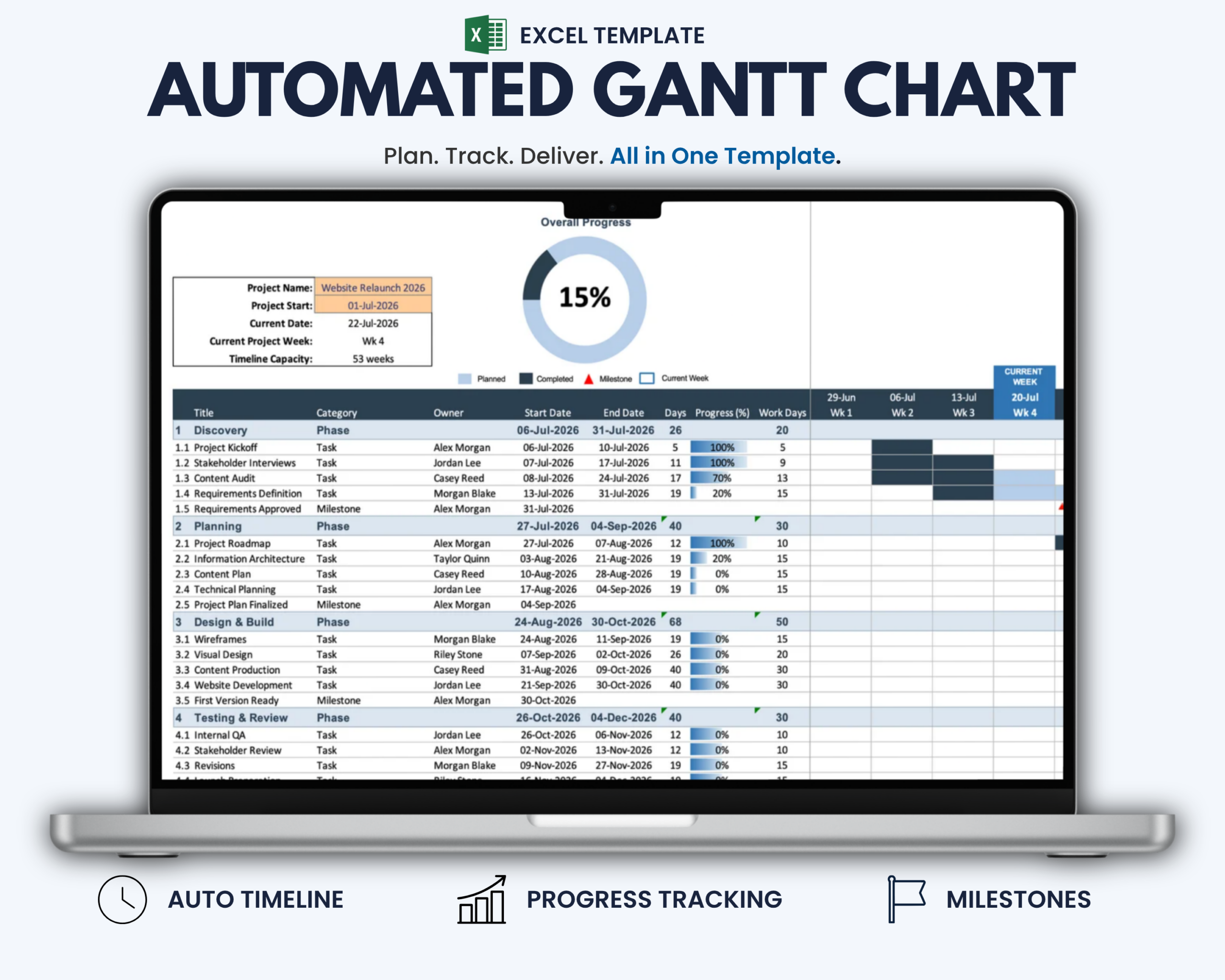
Instead of building a project timeline manually, enter your project start date, tasks, milestones, owners and progress information. The template automatically transforms your data into a visual 53-week Gantt timeline with dynamic task bars, milestone markers, current-week highlighting and an overall progress chart.
It gives you one clear view of project timing, responsibilities and progress from initial planning through delivery.
What This Gantt Chart Helps You Do
- Create a clear visual project timeline
- Organize project phases, tasks and milestones
- Assign responsibilities and track important dates
- Monitor task progress with automatically updating bars
- Identify the current project week at a glance
- Review overall project progress in one central view
- Keep project scheduling information in one structured workbook
- Reduce manual timeline formatting and updates
What’s Included
Your digital download includes:
- 1 Gantt chart template for Microsoft Excel
- Automated 53-week project timeline
- Task, phase and milestone visualization
- Dynamic progress tracking
- Visual overall progress chart
- Automatic current-date and current-week display
- Integrated step-by-step instructions
Key Features
- Automatic Gantt timeline based on your project start date
- Project schedules of up to 53 weeks
- Visual planned and completed task bars
- Progress bars that update based on your entries
- Milestone markers for important project events
- Automatically updated current date
- Highlighted current project week
- Workday-weighted overall progress calculation
- Editable project name, start date, tasks, owners and progress fields
- No macros or additional software required
How It Works
- Enter your project name and project start date.
- Add your phases, tasks, milestones, owners and project dates.
- Update the progress percentage as work is completed.
- Review the automatically updated timeline, task bars, current week and overall progress chart.
No macros or additional project management software are required.
Built for Freelancers, Project Managers and Small Teams
This Excel Gantt chart is particularly suitable for:
- Freelancers and consultants managing projects
- Project managers and team leads
- Agencies and service providers
- Small businesses and small teams
- Consultants managing client deliverables
- Anyone who needs a structured Excel-based project timeline
Microsoft Excel Compatibility
This product includes the Microsoft Excel version only.
The template is designed for current desktop versions of Microsoft Excel on Windows and Mac.
Older Excel versions may not display all formulas, colors or conditional formatting correctly.
Google Sheets, Apple Numbers and other spreadsheet applications are not recommended for this Excel file.
No macros or additional software are required.
Google Sheets Version
Prefer to manage your projects in Google Sheets?
A dedicated Google Sheets version of this Gantt Chart is available separately in the Optimizoo shop.
Converting the Excel file to Google Sheets may affect formulas, formatting and automated functionality. For reliable use in Google Sheets, use the dedicated Google Sheets version.
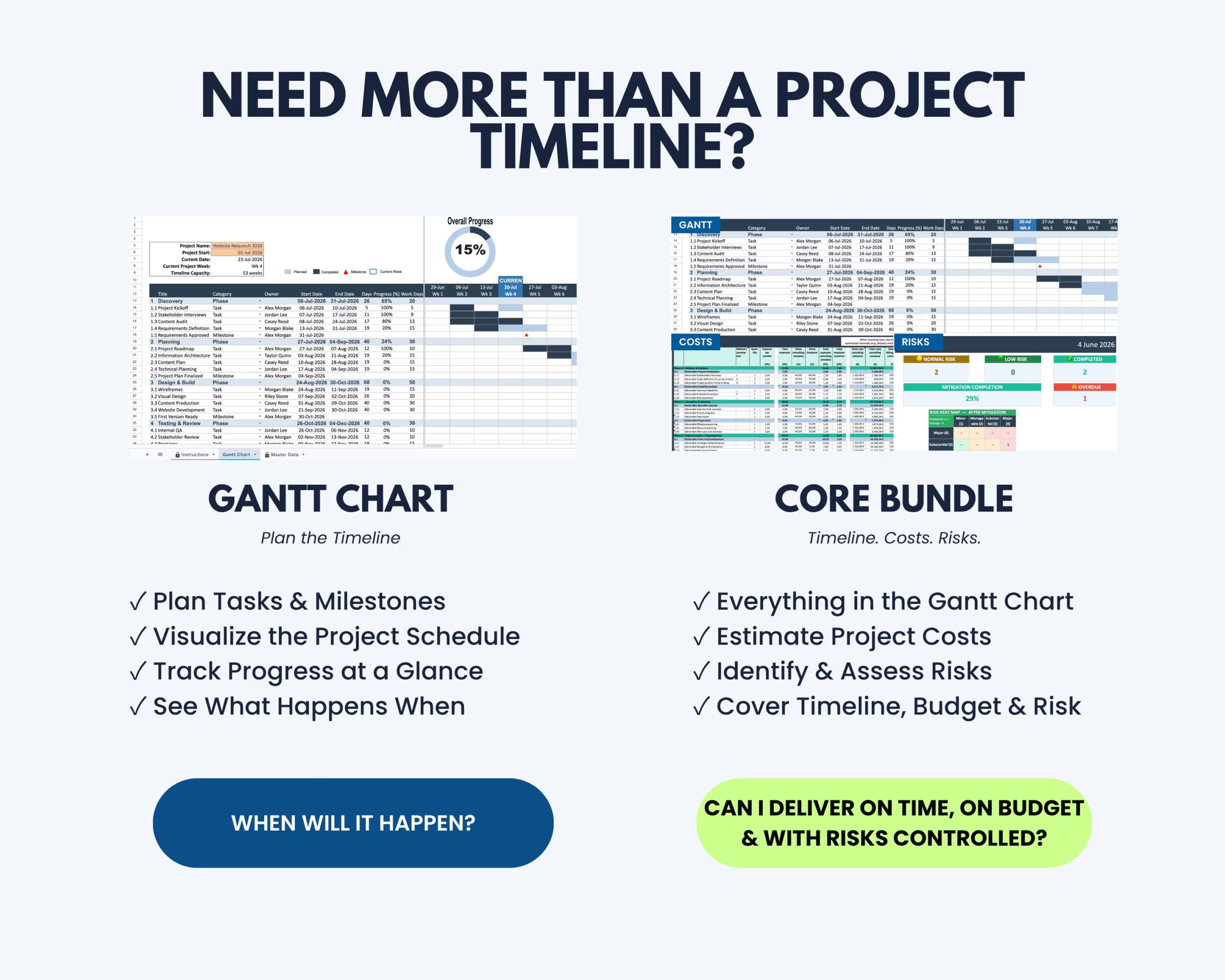
Need More Than a Gantt Chart?
The Project Management Bundle includes this Gantt Chart together with additional project management tools for organizing projects, tasks and workflows in a more complete system.
If you need more than a standalone project timeline, the bundle provides the broader project management solution.
Important Information
- This is a digital product. No physical item will be shipped.
- The purchase includes the Microsoft Excel Gantt Chart template with integrated instructions.
- The timeline supports project schedules of up to 53 weeks.
- Full functionality is not guaranteed in older Excel versions, Google Sheets or alternative spreadsheet software.
- This template is intended for project planning and internal organization.
- It is not a cloud-based project management platform.
- Please review the compatibility information before purchasing.
If you experience a technical issue with the file, please contact the Optimizoo support team.
License and Conditions of Use
Your purchase includes a non-exclusive, non-transferable license for personal, business and educational use.
You May
- Use the file for personal purposes
- Use the template internally within your own business
- Use the template for educational purposes such as teaching or studying
You May Not
- Resell, share or redistribute the template
- Upload, sublicense or reproduce the template in whole or in part
- Use the template to create products or services for clients or customers
- Redistribute modified or unmodified versions of the template
The license is granted for an unlimited period. Restrictions relating to resale, sharing and redistribution apply permanently.
Keep Your Project Timeline Clear
Use the Gantt Chart Excel Template to turn project tasks, milestones and deadlines into one visual timeline.
Keep responsibilities, timing and overall progress visible from planning through delivery without building a Gantt chart from scratch.



Reviews
There are no reviews yet.