



Break-Even Analysis Excel Template for Profitability Planning
The Break-Even Analysis Excel Template helps business owners, freelancers, consultants and professionals evaluate when revenue covers total costs and how changes in price, variable costs and sales volume affect profitability.
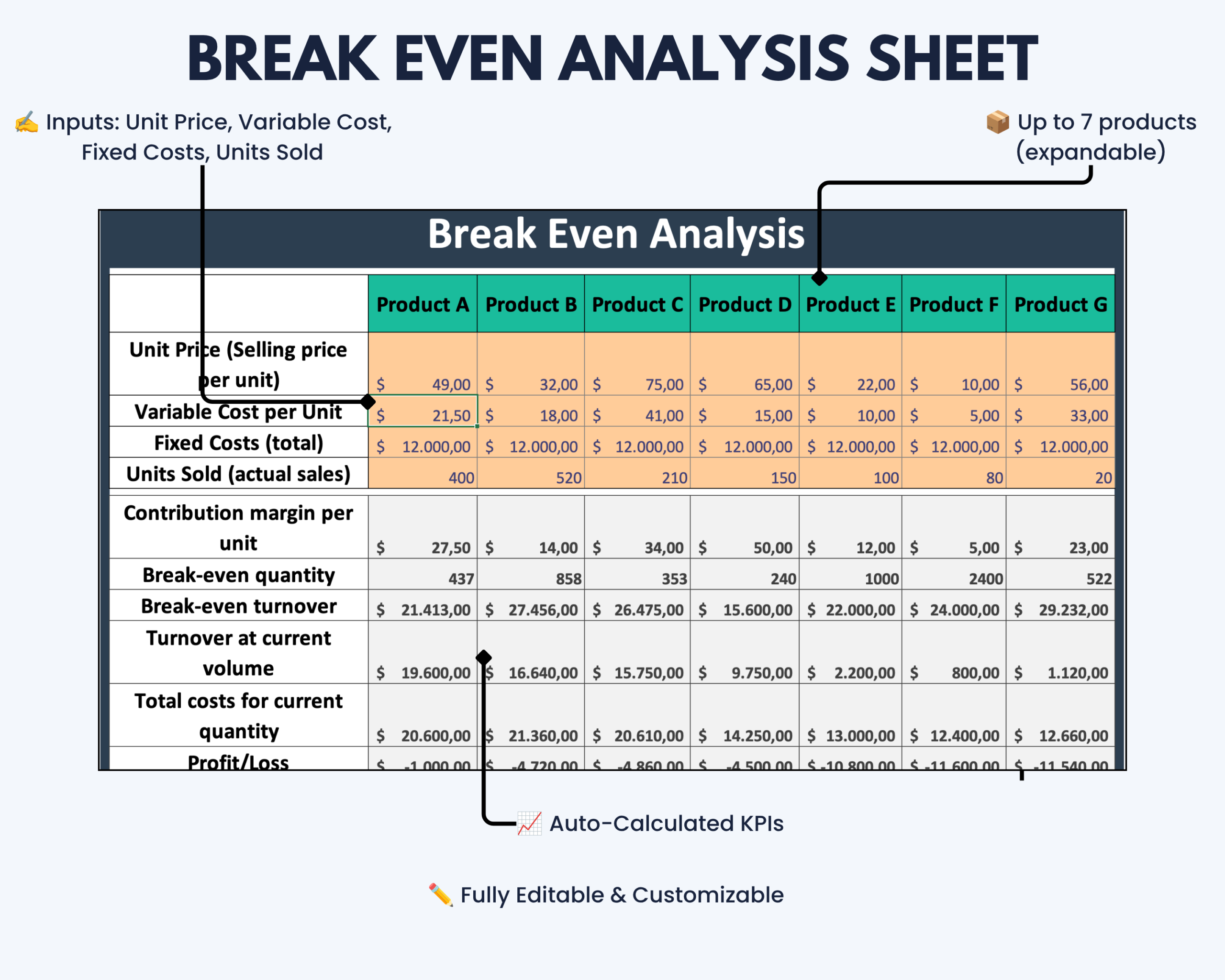
Instead of calculating break-even values manually, enter your product data and let the template automatically calculate contribution margin, break-even quantity, break-even revenue and profit or loss.
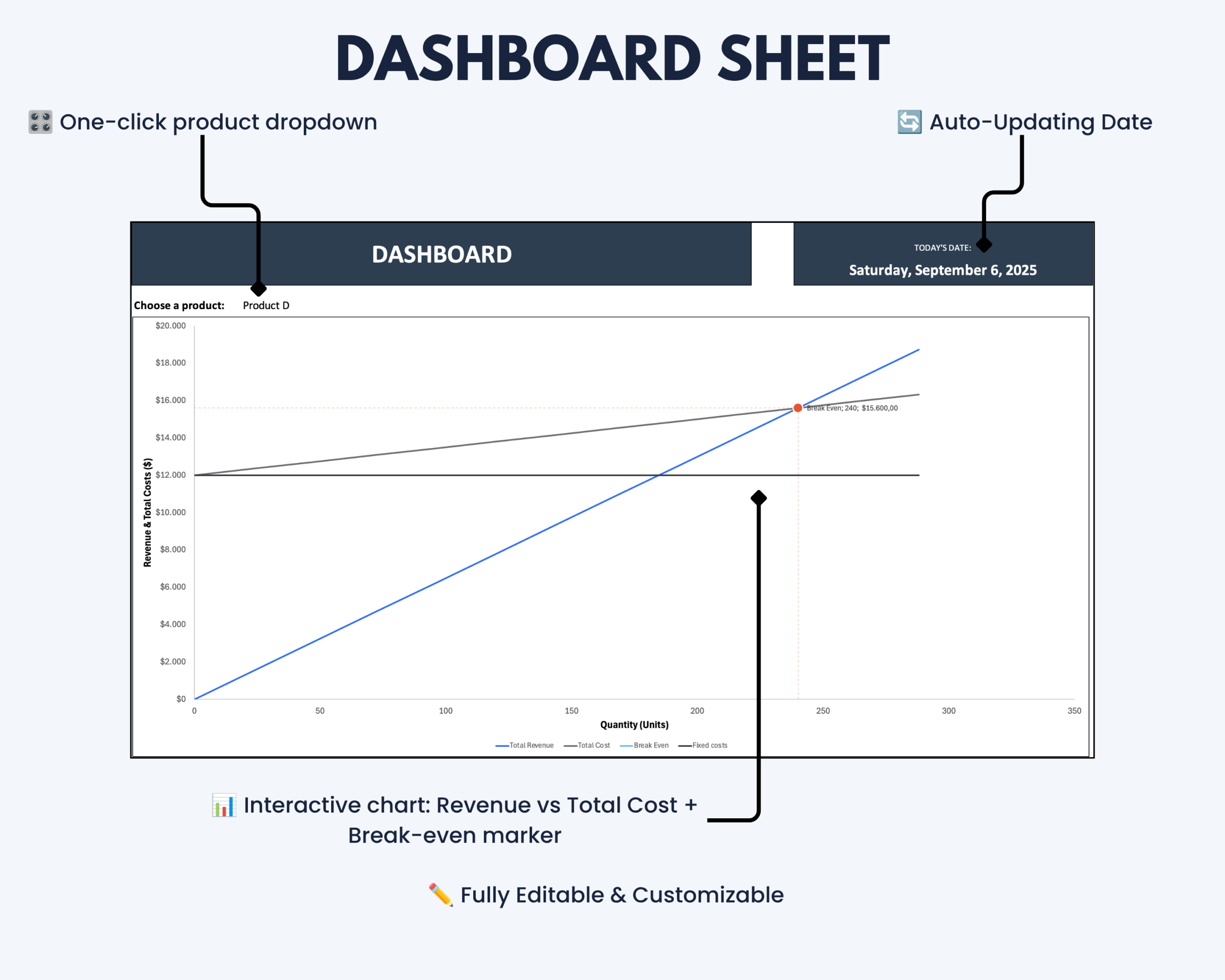
Select a product from the dashboard dropdown to update the interactive chart and visualize revenue, total costs and the calculated break-even point.
What This Break-Even Analysis Helps You Do
- Calculate when revenue equals total costs
- Determine break-even quantity automatically
- Calculate break-even revenue
- Monitor contribution margin
- Evaluate profit or loss at different sales volumes
- Compare pricing and cost assumptions across products
- Visualize revenue and total cost relationships
- Review the calculated break-even point in an interactive chart
- Support pricing, cost and profitability planning
What’s Included
Your digital download includes:
- Microsoft Excel Break-Even Analysis template
- Product input area
- Automatic break-even calculations
- Contribution margin calculation
- Break-even quantity calculation
- Break-even revenue calculation
- Profit and loss calculation
- Interactive break-even dashboard
- Revenue vs. total cost chart
- Product selection dropdown
- Step-by-step instructions
Key Break-Even Metrics
The template automatically calculates key values used in break-even analysis:
- Contribution Margin – the amount remaining after variable costs
- Break-Even Quantity – the number of units required to cover total costs
- Break-Even Revenue – the revenue level required to reach the break-even point
- Profit / Loss – the calculated result based on your entered assumptions
These calculations help provide a clearer view of how pricing, costs and sales volume influence profitability.
Key Features
- Interactive break-even chart
- Revenue and total cost visualization
- Clearly marked break-even point
- Automatic contribution margin calculation
- Automatic break-even quantity calculation
- Automatic break-even revenue calculation
- Automatic profit/loss calculation
- Dashboard product selection using a dropdown menu
- Support for up to 7 products by default
- Expandable product structure
- Protected helper areas for a cleaner workflow
- Editable input fields
- Consistent time-basis setup
- Step-by-step instructions included
How It Works
- Enter your product information, pricing and cost assumptions.
- Add the relevant sales volume data.
- Select the product you want to analyze from the dashboard dropdown.
- Review the automatically calculated break-even metrics.
- Use the interactive chart to compare revenue and total costs.
- Adjust your assumptions to evaluate different pricing, cost or volume scenarios.
The result is one structured overview of your break-even position and key profitability drivers.
Built for Business and Profitability Planning
This Excel break-even calculator is particularly suitable for:
- Small business owners
- Freelancers and solo founders
- Consultants
- Product and service businesses
- Professionals evaluating pricing decisions
- Teams reviewing cost structures
- Business planning and profitability analysis
- Anyone who needs a reusable Excel-based break-even calculation
Microsoft Excel Compatibility
This product is designed for Microsoft Excel and optimized for current desktop versions.
Older Excel versions or alternative spreadsheet applications may not display all formulas, charts, formatting or automated functionality correctly.
Google Sheets, Apple Numbers and other spreadsheet applications are not recommended unless specifically stated otherwise.
A current desktop version of Microsoft Excel is recommended for reliable functionality.
Customization and Worksheet Protection
Product names, prices, costs, volumes and other designated input values can be edited to match your own analysis.
Important formulas and helper areas are protected or separated from the main input sections to help reduce accidental changes and maintain a clean dashboard.
The default setup supports up to seven products. Expanding the structure further may require adjustments to formulas, chart references or supporting ranges.
Basic Excel knowledge is recommended for advanced structural modifications.
Important Information
- This is a digital product. No physical item will be shipped.
- The purchase includes the Microsoft Excel Break-Even Analysis template.
- The template is intended for business planning, profitability analysis and internal decision support.
- Results depend on the pricing, cost and volume assumptions entered by the user.
- Calculated results should be reviewed in the context of your own business circumstances.
- The template does not provide financial, accounting, tax or legal advice.
- Compatibility and functionality may differ in older Excel versions or alternative spreadsheet applications.
- Please review the compatibility information before purchasing.
If you experience a technical issue with the file, please contact the Optimizoo support team.
License and Conditions of Use
Your purchase includes a non-exclusive, non-transferable license for personal, business and educational use.
You May
- Use the file for personal purposes
- Use the template internally within your own business
- Use the template for educational purposes such as teaching or studying
You May Not
- Resell, share or redistribute the template
- Upload, sublicense or reproduce the template in whole or in part
- Use the template to create products or services for clients or customers
- Redistribute modified or unmodified versions of the template
The license is granted for an unlimited period. Restrictions relating to resale, sharing and redistribution apply permanently.
Understand Your Break-Even Point More Clearly
Use the Break-Even Analysis Excel Template to bring pricing, costs, sales volume and profitability calculations together in one structured workbook.
Evaluate your break-even position and test different business assumptions without building the calculations and charts from scratch.



Reviews
There are no reviews yet.